

Reviewed July 11, 2026. This practical checklist is educational and is not a substitute for a security assessment, legal advice, or requirements specific to regulated data.
You do not need to be a security engineer to ask whether an AI-built app protects the people using it. You do need evidence. “The login screen worked” is not evidence that accounts, records, secrets, and recovery paths are safe.
This checklist translates themes from the OWASP Application Security Verification Standard, the OWASP Top 10, and the NIST Cybersecurity Framework into questions a founder, operator, or product owner can use before launch.
The launch rule: prove the boundary
Most business apps have a boundary: customers see their own records, staff see assigned work, administrators see broader settings, and the public sees almost nothing. Draw that boundary as a table before testing.
| Record or action | Customer | Staff | Administrator |
|---|---|---|---|
| View customer request | Own only | Assigned only | All |
| Edit request | Own, while draft | Status and public note | All |
| Read private staff note | Never | Assigned only | All |
| Change a user role | Never | Never | Allowed and logged |
| Export customer data | Own only | Never | Approved process |
Then create one test account for each role. Attempt every forbidden action directly, including changing an ID in a URL or request. The server must reject it. Hiding a button is useful interface design; it is not access control.
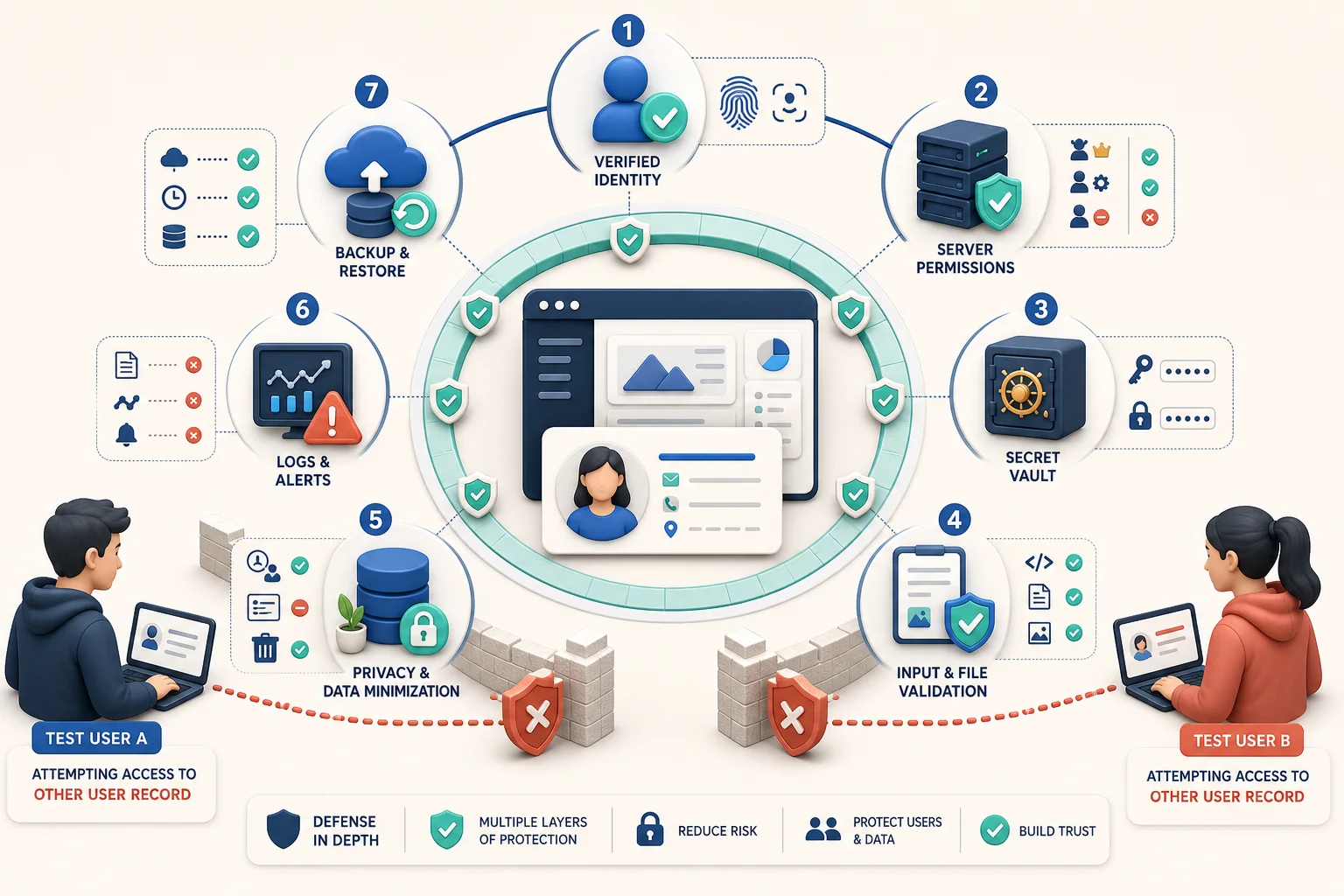
1. Accounts and sign-in
- Require a verified destination before activating an email or phone-based account.
- Use a trusted identity system instead of inventing password storage.
- Offer multifactor authentication for administrators and anyone with broad data access.
- Make password reset or sign-in recovery expire, work once, and avoid revealing whether an account exists.
- Invalidate sessions after password changes, account suspension, or role changes.
- Rate-limit repeated sign-in and recovery attempts.
Test the boring moments: open an old reset link, remove a staff member’s access while they are signed in, and sign in from two devices. NIST’s current digital identity guidance is Special Publication 800-63-4; use it when choosing authentication strength for higher-risk apps.
2. Permissions on every record
- Enforce ownership and role checks on the server for every read, create, update, delete, download, and export.
- Deny access by default when a rule is missing or ambiguous.
- Keep administrative routes and actions separate from ordinary user permissions.
- Do not trust a role, price, owner ID, or approval flag sent by the browser.
- Log sensitive permission changes with who, what, and when.
A quick adversarial test: sign in as Customer A, copy the URL of Customer B’s record, and try view, edit, file-download, and API requests. Repeat after downgrading a staff account. Record the rejected result; a verbal “it should be fine” does not make the launch folder.
3. Secrets and third-party connections
- Keep API keys, database credentials, signing secrets, and private tokens out of browser code, prompts, logs, and source control.
- Use separate credentials for development, staging, and production.
- Give each integration only the permissions it needs.
- Plan rotation: know how to replace a leaked key without rebuilding the app.
- Verify webhook signatures and reject stale or replayed requests when the provider supports it.
Open the browser’s developer tools and search loaded scripts and network responses for obvious secret values. Search the exported project history too. If an AI assistant ever saw a real credential, treat the credential as exposed and rotate it.
4. Input, files, and AI features
- Validate inputs on the server, including type, length, allowed values, and business rules.
- Restrict file type and size; rename uploads; scan or isolate files according to risk; never execute an uploaded file.
- Encode output for its destination so user content cannot become executable page code or a database command.
- Assume text sent to an AI model may contain instructions designed to override your workflow.
- Keep AI-generated drafts visibly distinct from approved records, messages, prices, or decisions.
- Require human review before high-impact actions such as payment, deletion, account suspension, medical or legal guidance, or sending a binding response.
An AI feature should have a failure state. Decide what happens when the provider times out, produces an empty answer, invents a field, or returns unsafe content. “Try again forever” is not a recovery plan; it is a small denial-of-service machine wearing a cheerful spinner.
5. Data collection and privacy
- Collect only information needed for a named business purpose.
- Document where each field is stored, which service receives it, and who can access it.
- Define retention and deletion rules before accumulating years of forgotten uploads.
- Use encryption in transit and appropriate storage protection.
- Give users an understandable privacy notice and a route to request access, correction, or deletion where applicable.
- Do not place sensitive personal or confidential customer data into an AI prompt unless the approved service and contract support that use.
Use fake but realistic test data during development. A production customer list is not a convenient bag of sample names. If your app handles payment data, health information, children’s data, precise location, government identifiers, or similarly sensitive records, get qualified compliance and security help before launch.
6. Logs, dependencies, and alerts
- Capture server errors and security-relevant events without logging passwords, tokens, or unnecessary personal data.
- Alert someone on repeated failures, unusual administrative actions, or service outages.
- Inventory third-party packages and remove dependencies you do not need.
- Apply security updates and retest the primary workflow after upgrades.
- Keep an owner for every external service, domain, repository, billing account, and production credential.
Trigger a harmless error and confirm it appears where the responsible person will see it. A dashboard nobody opens is an archive, not monitoring.
7. Backups and incident recovery
- Back up customer data and configuration on a schedule that matches how much work the business can afford to lose.
- Restore a backup into a safe environment; do not assume a green “backup complete” badge proves recovery.
- Keep a known-good release and a documented rollback path.
- Write a one-page incident plan: who investigates, who can disable access, who communicates, and where evidence is preserved.
- Know how to revoke sessions, rotate credentials, pause integrations, and contact service providers.
The 30-minute prelaunch drill
- Use two customer accounts to attempt cross-account access.
- Downgrade a staff account and confirm its old session loses privileges.
- Submit oversized, malformed, and unexpected inputs.
- Disconnect one external service and observe the customer-facing failure state.
- Trigger a server error and locate the alert and useful log entry.
- Restore a recent backup or demonstrate the documented restore procedure.
- Export the release, dependency list, owners, and emergency contacts into a location the team can access during an outage.
Record failures, assign an owner, and retest. For platform selection, pair this checklist with the 25-point AI app-builder scorecard. For requirements, start from the permissions and failure states in our worked customer-portal specification.
Editorial note: App9.co is owned by AccelerMedia LLC, which operates App9 Builder. This checklist applies to any generated or traditionally built web app. Product owners remain responsible for testing, appropriate expert review, and the laws and contracts that apply to their users and data.